Admin

Operator of FMK
Admin

Admin

Operator of FMK

Personal Brand X by Gusten Sun | Funnels University

  • 3
  • 0
image.png

The #1 course + community + coaching program all in one, including all the systems, processes, templates and scripts you need to scale your personal brand from zero to 6-7 figures with multiple revenue streams.

The YouTube to Clients Academy by Wes McDowell

  • 4
  • 0
TYCA-Devices-Mockup-Sales-Pg-1.jpg

The only course that helps service businesses leverage YouTube as their primary marketing strategy to generate quality leads who are dying to work with you… Without paying for ads, following the never-ending trend cycle, or posting everywhere just to stay in the game.

Twixtor Pro v8.0.7 for AE/ Pr | MacOS

  • 20
  • 3
PhDDxi3.jpeg

Intelligently slow down or speed up your image sequences with visually stunning results. Twixtor is more accurate and exhibits fewer artifacts when there are objects crossing in the scene. This means less tearing and stretching of objects as they cross or go out of the frame.

Paid Beginner Colorist Career Path by Filmmakers Academy | vi/en-sub [$]

  • 16
  • 1
big-77474f07-2c23-4e34-b898-6673b98afc55.jpg

Welcome to our Beginner Colorist Career Path, where we dive deep into the captivating world of color with Master Colorist David Cole and DIT/Colorist Derek Johnson, who empower beginners to become skilled and confident colorists in the film industry!

Video Copilot Element 3D v2.2.3 - SUPER BUNDLE (Win/Mac)

  • 4,473
  • 10
hkvelOy.jpg

Video Copilot has released Element 3D, an After Effects plug-in that lets you import and animate 3D models, even as a particle array, and extrude text and mask shapes in real time. The new version of After Effects features Multi-Frame Rendering, which allows AE to render multiple frames at the same time to speed up rendering!


Suno AI Prompt Guide (Instruments) by Travis Nicholson

  • 7
  • 0
Suno-AI-Prompt-Guide.png

Your ultimate toolkit for creating more expressive and genre-rich AI music. Suno AI is powerful, but only if you know how to prompt it properly. This guide gives you 200+ instrument-focused prompts, broken down by style and category, to help you craft better music.

Swift Slides v1.1.0 for Premiere Pro | Win/Mac

  • 11
  • 0
swift-slides-logo-1920x768-1.jpg

Swift Slides is a Premiere Pro extension built to create simple fast slideshows (with transitions) that automatically fit to your selected music or audio. Options include automatic resizing of images, zoom (in, out, or random), pan and transitions.

LipsyncTool v1.0 for After Effects | Win/Mac

  • 8
  • 0
lipsync-tool-1920x768.png

Lipsync Tool for After Effects. Smooth, Marker-Based Lip Sync — Without Expressions. Built around a simple system of preset and art layers, it lets you drop in viseme keyframes with a click, making complex mouth animations as easy as working with holds.

Multi-Cam Edit Pro v1.0 for After Effects

  • 8
  • 0
multi-cam-banner-base-small-and-thumbnail-1.jpg

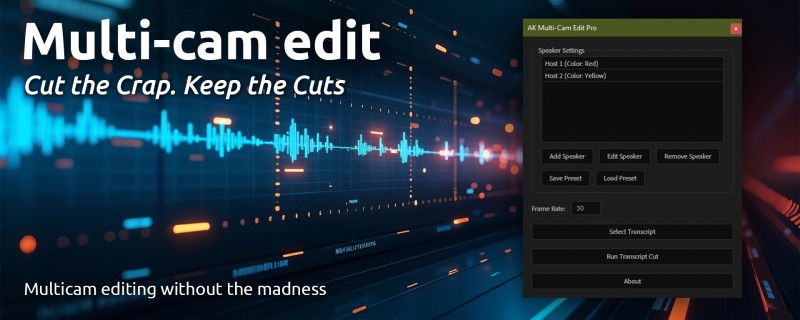
Multi-Cam Edit automates multi-camera editing in After Effects using a transcript exported from Premiere Pro (saved as a text file). Based on the timecodes and speaker names in the transcript, Multi-Cam Edit automatically cuts the corresponding video layers in After Effects, allowing you to quickly reconstruct your multi-camera edit.

Marker Maestro Pro v2.0.1 for AE (Win/Mac)

  • 5
  • 0
image.png

Marker Maestro Pro has been completely rebuilt and updated, taking all of a Comp's markers (from the timeline and each layer), and lays them out like a spreadsheet. Every field is editable, and you can update one or multiple markers instantly. Single Markers update with a press of the Return or Tab keys.

Super Sweeper v1.1 for AE Win/Mac

  • 9
  • 0
super-sweeper-1920x768-new.png

Instantly sorts your comps and assets, eliminating unnecessary folder depth and consolidating assets by file type while protecting the things you don't want to be reorganized.

SplitGrid 1.1 for AE [WiN/MaC]

  • 8
  • 1
JvgMbh3.jpeg

SplitGrid makes it super easy to create split screens, video grids and grid lines of all kinds. Just select your layers, how many rows or columns to arrange them in, and with the click of a button they'll be perfectly arranged within any size comp.